
June 10, 2024

Setting up Cube Data Manager Solution: Add New Environment

  • June 10, 2024
  • 3 replies
  • 0 views

Hello,

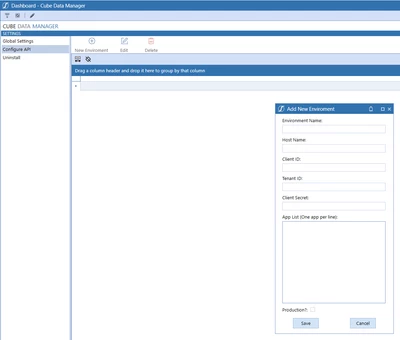
I am trying to set up the Cube Data Manager solution from Open Place in my working production application. Currently it is all loaded up, but I need a little help figuring out how to add the environment to it containing the applications that I want to work with. Please see pictured below.

Jmorgan_0-1718038823722.png


Thank you,

Jeremy Morgan

3 replies

June 10, 2024

Hi, there is something in the documentation about this:


Henning_0-1718042051013.png


Henning_3-1718042354337.png

The specific environment information is only know by you, so hopefully the CDM instructions get you going.


For the wider audience: The instructions are not part of the "Download". Those need to be retrieved here:


Henning_2-1718042224920.png


JmorganAuthor
June 10, 2024

Where would I be able to find the Client ID, Tenant ID, and Client Secret?

June 11, 2024

Hi, not being an integration specialist myself, I think this you will find on the Azure side of things. If you Google the above terms plus Azure, you will find posts helping you find this in Azure.

I found answers using "azure client secret where to find" on Google. I did not try any of the machine learning tools but I imagine those might be helpful as well if you prefer those.

June 11, 2024

To get the information you are requested that would be done by your IT department, they will login to your organizations Azure Portal and setup an app registration, there they will connect a service account to your onestream SSO application. more details can be found in the design and reference guide for setting up Rest API. if your organization has OIS enabled i recommended you just create a PAT token more information can be found in this post

https://community.onestreamsoftware.com/t5/OpenPlace/Just-Added-to-OpenPlace-FXM-and-CDM/m-p/35201#M181

December 20, 2024

Hi, were you able to get this to work ? I have a similar requirement however It's for historical data

My questions is, will the new solution copy consolidated Data ? I don't want to try and recreate historical data as the logic for the BR's might not have been properly time constrained

Thanks

December 20, 2024

BernardoN, it will not load consolidate data just direct cube data but there is a button in there that generates a DM job you can technically add a consolidation as a step in the sequence so after the data loads it then consolidates. the latest update for version 8.4, Which is still in QA, focuses more on the environment add processes and minor code tweaks to optimize for .NET core 8