
November 11, 2025
Solved

Time/data setting in data source/Transformation rule for Multiperiod upload (delimited files)

  • November 11, 2025
  • 2 replies
  • 2 views

Hi Everyone,

I'm trying to build Data source and transformation rule for multi period manual data load through single file. The import step didn't succussed.
Can anyone suggest time settings in data source & transformation rule. I selected data type as "Stored Data key text" in Data source .
My source file format is  Col1 has GL accounts, Col2-13 Jan to Dec data.
 

Best answer by LinaU

Hi uvrao33,

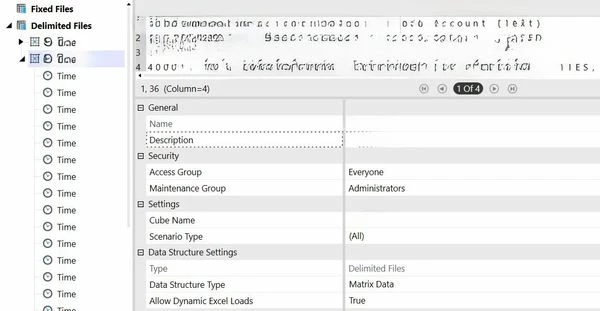
When you select the Data Source at the top, look at the Properties section on the bottom half of the page, just below the data source image. That’s where you’ll find the Data Structure Type field set to Matrix Data:


2 replies

November 11, 2025

You may find practical advice from some of the "Matrix" posts as linked. GL.
Matrix - Search | OneStream Community

November 12, 2025

Hello,

You should set the Data Source Property – Data Structure Type to Matrix Data instead of Tabular Data. Then, create eleven additional Time Source Dimensions, set their Data Type to Matrix DataKey Text, and map them to your columns, like this:


uvrao33Author
November 12, 2025

Hi LinaU,

I don't see Matrix data option for Data Type, I've options Data Key text, Stored Datakey text, Global Datakey time and Current datakey time. Please advise where can I get Matrix data.

LinaUAnswer
November 12, 2025

Hi uvrao33,

When you select the Data Source at the top, look at the Properties section on the bottom half of the page, just below the data source image. That’s where you’ll find the Data Structure Type field set to Matrix Data: