
February 10, 2023
Solved

WINSCP .filepart extension on SFTP files sent from OneStream

  • February 10, 2023
  • 6 replies
  • 2 views

We created Extensibility BRs that leverage WIN SCP commands to send data from OneStream to an internal directory using an SFTP connection setup with OneStream.  The data files are being received with a .filepart extension.  We were able to get the .filepart feature disabled in our OneStream environment; however, the csv files are continuing to be received with the additional .filepart extension.  Any suggestions on how to eliminate .filepart extension when files are sent / received?
Best answer by mtejjini


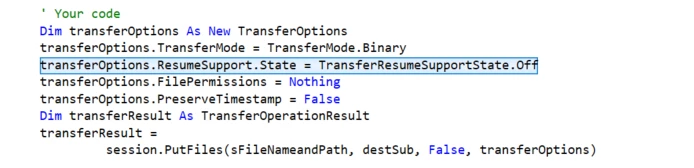
Hello, use this and you won't have the .filepart extension. Thanksimage.png

6 replies

February 10, 2023

This seems more of a winscp question than a OneStream question... In any case, I don't think anyone will be able to help unless you post the actual rule.

February 12, 2023

This worked for me using WINSCP PutFiles command...

Dim sessionOptions As New SessionOptions

With sessionOptions

    .Protocol = Protocol.Sftp

    .HostName = "example.com"

    .UserName = "username"

    .UserName = "password"

    .SshHostKeyFingerprint = "ssh-rsa 2048 ..."

End With

Using session As New Session

    session.Open(sessionOptions)


    session.PutFiles("C:\local\path\*.csv", "/remote/path/*").Check()

End Using

February 12, 2023
mtejjiniAnswer
February 28, 2023


Hello, use this and you won't have the .filepart extension. Thanksimage.png

February 28, 2023

mtejjini_0-1677581378382.png


March 1, 2023

Thanks for the suggestions.  We did receive a recommendation from OneStream to add the one line of code to the SFTP Business Rule that mtejjini mentioned above.

 -->  transferOptions.ResumeSupport.State = TransferResumeSupportState.Off

Adding this line of code has resolved the issue and we are now able to provide the required data to the SFTP site.

Thanks for the support!!