
July 11, 2024

Workflow error

  • July 11, 2024
  • 2 replies
  • 0 views

Hi All:

I have created a new Datasource of Trail Balance which is excel source. I have written a complex expression in the logical operator. the logic is, if there is an amount in the debit column, bring that amount in, but if debit column is blank, bring the credit amount ((not negative)) in as a credit amount. I have below DataSource connection:
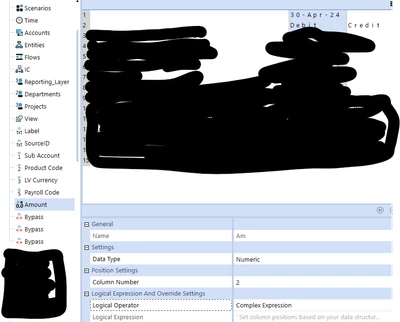

Rams_2022_0-1720733988329.png


the code in the Logical operator:

Dim debitColPosition As Integer = 2
Dim creditColPosition As Integer = 3

Dim AmountDR As String = api.Parser.DelimitedParsedValues(debitColPosition)
Dim AmountCR As String = api.Parser.DelimitedParsedValues(creditColPosition)

If (IsNumeric(AmountDR) AndAlso Not AmountDR = "0") Then
Return CDec(AmountDR)
ElseIf (IsNumeric(AmountCR) AndAlso Not AmountCR = "0") Then
Return CDec(AmountCR)
Else
Return 0.0
End If

when I am running through workflow, the source is trail balance file. I am getting the below error. any suggestions please if anything I am missing here.

Error:

Unable to execute formula. Index was out of range. Must be non-negative and less than the size of the collection.
Parameter name: index

2 replies

July 12, 2024

It sounds as though the script is trying to process a line that does not have the credit/debit data on it - possibly a header line. I would put a check in the complex expression that makes sure the line contains the data - maybe count the instances of api.Parser.Delimiter?

Rams_2022Author
July 12, 2024

Thank you MarcusH I see. Debit column assigned as column number as "2" for amount. I need to assign the credit column number as "3" for the amount so that program can understand. but i don't see another amount as column in my Delimited Datasource I created. How to add another amount column to map the credit to that? 

July 12, 2024

You are getting the error because api.Parser.DelimitedParsedValues uses an index, so the first column would be 0, second column would be 1, and the third column would be 2. In your case, you would want the debit position as 1, and the credit as 2 for this api.

Since you can only set the amount to one column, use the debit column. When the debit column is non numeric, you need to set this,  api.ValueIsNumeric = True, and then use the credit amount. Otherwise it will skip over the record for being invalid. 


If (Not api.ValueIsNumeric AndAlso Not AmountDR = "0") Then

Dim creditColPosition As Integer = 2

'Since the parser already split the entire line, we can just grab the column we want from the parser
Dim amountCR As String = api.Parser.DelimitedParsedValues(creditColPosition)

If (IsNumeric(amountCR) = True) Then
'The parser thinks the debit value is Non-Numeric, since we are now putting in the credit value
'we have to tell the parser that the value is now numeric.
api.ValueIsNumeric = True
Return "-" & amountCR
Else
Return args.value
End If
Else
'Debit value is a number, so just return the debit value
Return args.value
End If