
March 23, 2023

Workflow error on load step - Value cannot be null. Parameter name: type

  • March 23, 2023
  • 3 replies
  • 1 view

Hello,

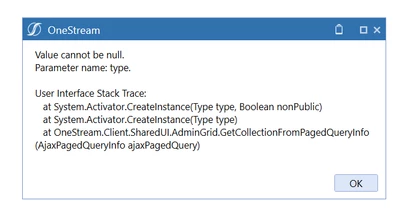
While trying to import data through a workflow from a *CSV file I am getting the error from below when performing the Load step of the workflow: These are the only details of the error, in the Task Activity there are no relevant details for this error.

This seems to be a generic error. Could this be related to the workflow setup or is it something else?

Thank you.

oanamihai_0-1679568532261.png


3 replies

March 23, 2023

You can enable detailed logging in the WFP and then run it . Check for more details in the child step in Task Activity.


oanamihaiAuthor
March 23, 2023

Hello OS_Pizza , thank you for your reply. The detailed logging is enabled but the details from the task activity do not seem relevant for the error:


oanamihai_0-1679576686344.png


oanamihai_1-1679576786948.png

Is there any other place I could check? Thank you.

March 23, 2023

I've seen that error popping up when I forgot something fundamental - like a transformation rule group for a dimension type missing in the TR profile, or an unmapped/mismapped dimension in the DataSource.

oanamihaiAuthor
March 24, 2023

Hello JackLacava , mitrad, thank you for your replies. Unfortunately, I tried making different changes to the data source and transformation rule but the same error kept appearing. I will try to disable the dimensions from the cube and maybe load one by one and see where the error starts appearing if it is data source related.

March 23, 2023

I think this is related to DataSource set up under Application tab.