
April 19, 2022

XFJ - Excel Import Journal Template

  • April 19, 2022
  • 3 replies
  • 0 views

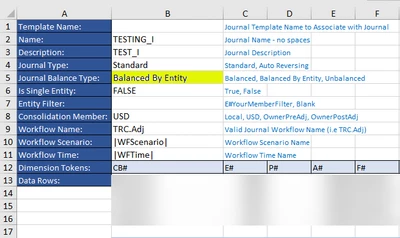
I uploaded the XFJ Excel template with the "Balanced by Entity" Journal Type. However, OneStream set back the Journal Type as "Balanced" instead of "Balanced by Entity after I imported the template . "Is "Balanced By Entity" not the correct selection?

Thanks,

kliau_0-1650404065601.png


3 replies

April 20, 2022

Can you try it with BalancedByEntity (without any spaces).
I suspect the text in the downloaded template (column C descriptions) is misleading.

March 4, 2024

That actually works for another field - specifically Journal Type - doesn't like Auto_Reversing in the Excel template, but AutoReversing works.

twn1Author
April 20, 2022

Thanks, I inputted "BalancedByEntity",  however, the application still returns "Balanced".  

Interesting finding here is that I tried "Unbalanced" for Journal Type, and it returned as expected as "Unbalanced". 

Thanks,
Karen 

September 12, 2023

I am having this issue as well, where I even attempted to change our standard JE template in the system to default to Balanced by Entity instead of Balanced, and the Journal will still only load the header with Balanced.  Any thoughts on how to fix this?  Is there a new template that can be downloaded from somewhere?